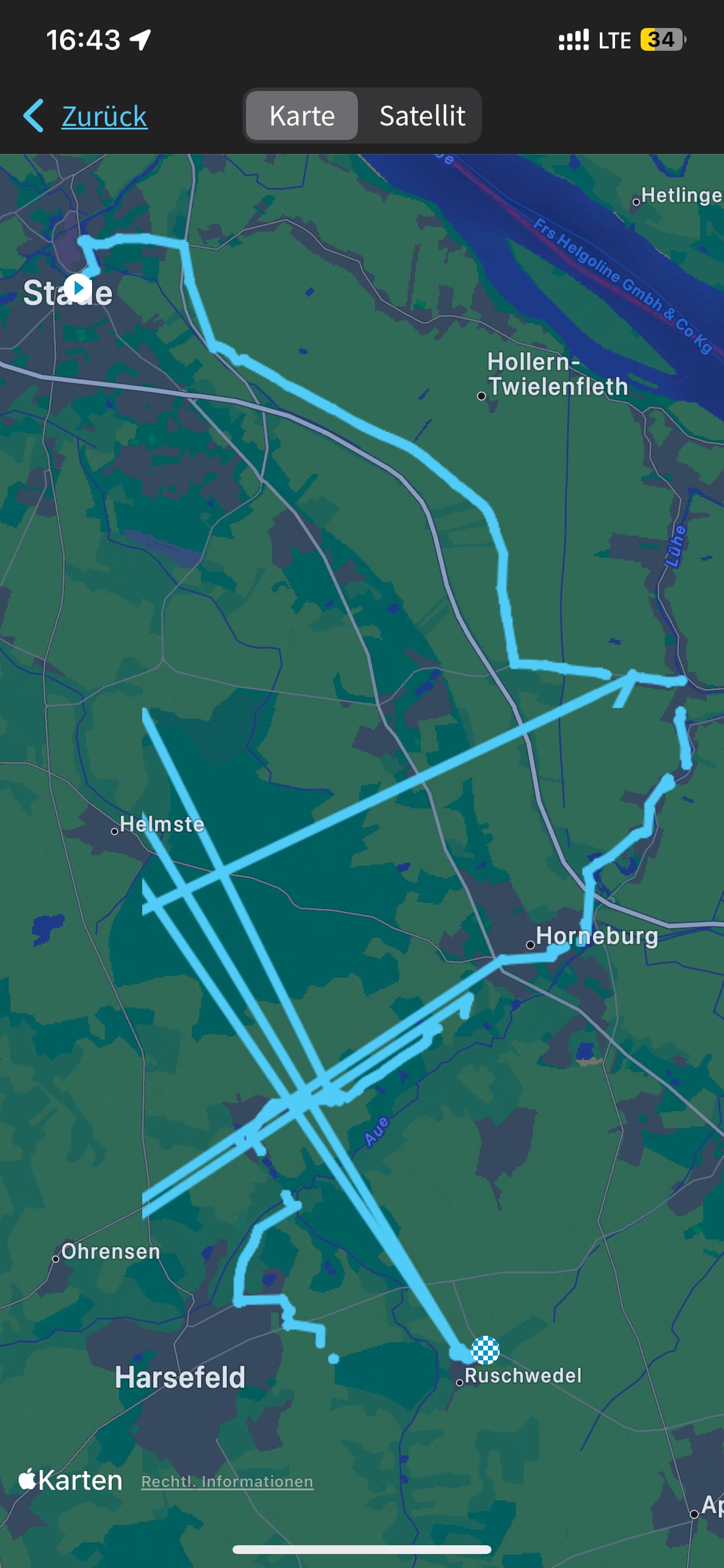
I recently experienced a massive problem with navigating a route with my Wahoo. I created the route in Komoot and synchronized it via the app, as usual. Navigating with a downloaded Komoot route always worked flawless for me before - but not on this day.
This particular route also looked good in the app, but once on the road the wahoo did seem to loose track of where I actually was about every couple of minutes or so and then it took quite a while until it went back to normal for a short while. Turning it off and back on and let it recalculate the GPS position did not help. I ended up having to use the komoot app on my mobile to find my way… very annoying/disappointing and of course unsafe…
Looking at the recording afterwards shows the whole desaster (see screenshot).
BUT: The recording of my usual training loop the next day was fine! But I do not need navigation there of course!
So, I tried riding my training route using a route I created in komoot today, and - sure enough - problems with loss of actual position, freezing of the map (which normally moves when riding) were back.
It seems that all of a sudden there is something wrong with navigating a route on my device, but the surprising thing is that it did work perfectly a while ago.
So my question is: Has anyone out there experienced similar problems? Or is there even a known problem with routes? Next I will try to do a navigation without a pre-downloaded route using the “take me to” function, to see if that is affected as well, or if it is something inside the routes that may be causing this. I also have some older routes created with komoot on the device which I could try, if the routes seem to be the problem.
The screenshot of the recording - but only a part of it. Some of it actually lies somewhere in the middle of the north atlantic (!)
Think there is an issue with all V1 units at the moment. My Bolt went haywire on Sunday, GPS kept dropping out, time was 1 hour our. speed was erratic etc. they are looking at a fix i think
rolling back is what Wahoo should be doing at this point, this incident is running for days now. any company with a decent IT Service Management and development department would have had the sense to roll back by now. the situation is ridiculous and avoidable.
sadly yes - after reading DC rainmakers article, it seems that older firmware versions will have the same problem, as it is an overflow of a counter variable, holding the number of weeks since January 2006. It means that all units of a certain generation will be affected, regardless what firmware version they are running.
I doubt it’s a bug in a recent firmware, otherwise I’m pretty sure that would have been considered. I suspect it’s a bug that’s been there since day one. Probably since they started working on the code which I’m guessing was maybe 2006, or thereabouts which is when the gps time has rolled around too.
With some of the new features implemented from recent firmware updates, they’d need to tread carefully rolling back as suddenly removing features can also cause issues - if not some disgruntled customers.
Sounds good in theory, but alas I don’t think its an option here.
And I totally get that, but sometimes there is an industry standard for counting time values, like there is with timestamps being counted from 1st Jan 1970 … or they may have been restricted to that as that’s what the gps chipset used, or another library they’re using may have also used that date. Many possibilities for why the rollover date predating the product/company existing.
they maybe knew about it when developing the initial product but reasoned that it wouldn’t matter as the device would be long obsolete and replaced by the time is became and issue - and it fell from mind as it was rectified in later devices code. So they maybe someone a victim of their own success in building robust hardware that just works way beyond original expected lifespan.
Most likely as stated by someone else on these forums, they used a third party chip for the gps function that had this firmware problem built in and just didn’t realize the problem would happen in August of 2025. So now they have had to figure out how to change that firmware as well as test it and ensure they don’t break any other functionality. Utility type functions like this are rarely if ever produced by the overall device maker like Wahoo.
The update definitely resolves the issue! In my case WR24-17055 (ELEMNT ROAM v1).
I would like to express a big thank you to the Wahoo team for providing a fix for this in such a timely fashion. Could it have been foreseen? Maybe. Does it matter now? No. All good - again, big thanks for timely support for a rather old product like this. I love my ELEMNT ROAM and will not give it away until I have to. Very happy to see that its time has not come (yet).
Via „System Info“ —> „Check for Updates“ on the device. The computer needs to be able to access the internet via your WiFi. There is a link to the detailed instructions in the linked article in my post 4 days ago. Good luck!
My Wi-Fi is working, the ROAM is updating routes and writing backups, so that can’t be the problem! The app even shows that there is an update available on iOS, but I can’t initiate it. What is the problem?